More people just ask now, instead of clicking. Is your brand in the answer?
Not long ago, finding a product, a service or a supplier meant typing a few words into Google, scanning ten blue links and opening a handful of tabs.
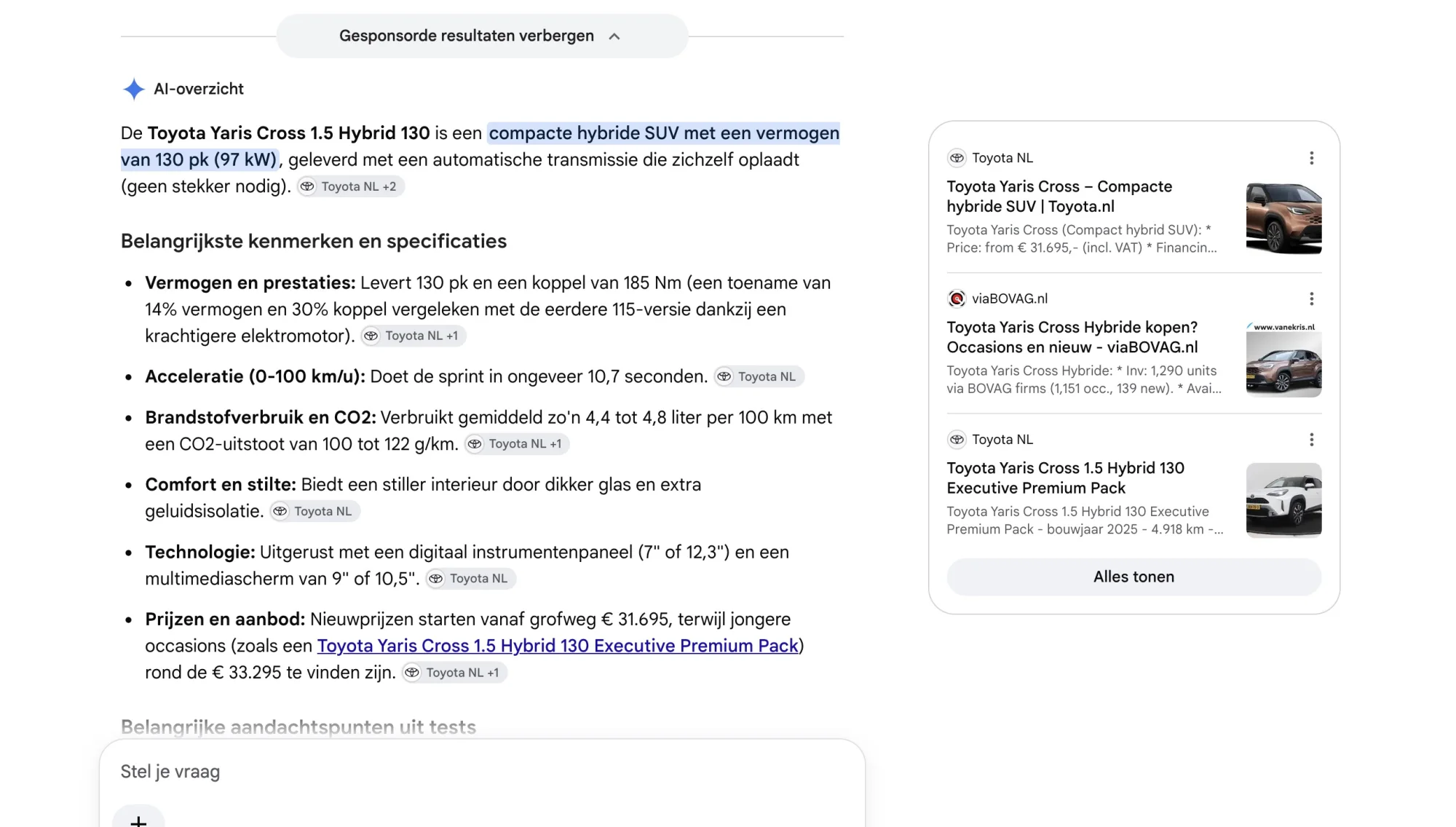
For a growing number of people, that routine has changed. They open ChatGPT, Claude, Gemini, Perplexity or Google's AI Mode, ask a full question, and get a short answer with a few brands already picked out for them.
Plenty of people still click. But more of them now stop at the answer, and the answer only has room for a few names. So here is the question worth asking: when someone in your market asks, is your brand in it?
If it isn't, you probably won't know. There's no ranking report for it and no line in your analytics. That's where generative engine optimization, or GEO, comes in. It's the habit of making your brand easy for AI tools to find, understand and mention. It's less mysterious than the name suggests, and if you've done decent SEO, you already have a head start.
How it differs from SEO
SEO is about being found in a list of results. GEO is about being part of the answer itself. The foundations are shared, but the goal and the way you measure it change.
| SEO | GEO | |
|---|---|---|
| Goal | Rank high, earn the click | Get mentioned in the answer |
| You measure | Rankings, traffic | Mentions, context, tone |
| Where it happens | Search results | AI assistants and AI search |
| Content style | Built to rank | Built to be quoted |
Nothing in that table says "forget SEO". AI tools lean on the same things search engines do: pages they can reach, content that's clear, sources that seem trustworthy.
Where to start
You don't need a big project to begin. These are the places I'd look first.
1. Ask the questions yourself
Before changing anything, find out where you stand. Write down ten questions a customer might ask before buying what you sell, then put them to a few different assistants, such as ChatGPT, Claude, Gemini, Microsoft Copilot, Perplexity and Google's AI Mode. Note who gets mentioned, who doesn't, and what reasons the AI gives.
Several of these tools can search the web while they answer, so what's on your pages today can feed into the result. They don't all give the same answer, which is exactly why it's worth asking more than one.
If your customers search in Dutch, ask in Dutch as well. The same question in two languages can bring up different brands, and the language your customers actually use is the one that counts.
It takes an hour and it's usually humbling. It also tells you more than any dashboard will on day one.
2. Say clearly who you are
AI tools build a picture of your brand from lots of small pieces. If your website says one thing, your LinkedIn page says another and a directory listing says a third, the picture gets fuzzy, and fuzzy brands get skipped.
Pick one plain description of what you do and who it's for. Then check that it matches everywhere your brand shows up. It's boring work, and it matters more than most clever tactics.
3. Write answers that survive being copied
AI tools tend to lift out single passages instead of reading whole pages. So a paragraph should still make sense when it's read alone.
A quick test: pick a paragraph from your site, paste it into a blank document, and see if it still tells the reader something useful. If it leans on "as mentioned above" or "this is why", it won't travel well. Put the point first, be specific, and cut the throat-clearing.
4. Don't live only on your own website
When people ask an assistant for a recommendation, the answer is often shaped by what others say about you. Reviews, forum threads, articles, videos and podcasts all feed into it.
You can't control most of that. You can show up where your customers already talk, give people something worth mentioning, and make it easy for them to do so.
5. Make sure machines can actually read your site
Check that your important pages load quickly, can be crawled, and don't hide their main content behind heavy scripts. Many AI crawlers are less patient than a human visitor with a modern browser. The technical section further down shows what to look at.
What this looks like on real pages
Advice like "be clear" sounds fine until you open your own site. Here is what it means in practice, using real products.
Product pages
Take the Brooks Ghost 17, a popular daily running shoe. Imagine you run a running store and need to write the product description. A typical line looks like this:
Before: "Run on clouds with our most comfortable shoe yet."
That sentence could describe any shoe from any brand. Here's a version with something to work with:
After: "The Brooks Ghost 17 is a neutral daily trainer for road running. It has a 36.5 mm heel stack and a 10 mm heel-to-toe drop, and weighs 286 g in the men's version and about 255 g in the women's. The cushioning is a nitrogen-infused foam that feels soft without being overly plush. It suits runners who want one comfortable shoe for easy miles and longer runs. It is not a racing shoe, and it is built for roads, not trails."
If someone asks an assistant for a cushioned everyday road shoe with a moderate drop, the second version contains the words and numbers to match that question. The first contains nothing to match.
The same shoe also shows why consistency matters. Reviews note that the Ghost 17 dropped from a 12 mm drop in the previous model to 10 mm. Yet several retailer pages for the Ghost 17 still list 12 mm. A model piecing together an answer from those pages sees two different figures for the same shoe, and a confused source is a less trustworthy source. If you sell products, check that your specs match the manufacturer's current page, and that you haven't carried over details from the previous version.
Car dealers
Car listings are a good test of this idea, because the questions people ask an assistant are very specific. Something like "a compact hybrid SUV that doesn't need plugging in, with a decent boot, from a dealer near Utrecht". A listing has to contain those facts to be a candidate.
Here is a typical listing:
Before: "Nice and economical SUV in perfect condition. Available immediately. Call for more information!"
Nothing in that text can be matched to a question. It doesn't say which car it is, what kind of hybrid, or what it costs.
After: "This Toyota Yaris Cross 1.5 Hybrid 130 is a compact crossover with a full hybrid system that never needs plugging in. It combines a 1.5-litre three-cylinder petrol engine with an electric motor for 130 hp, and comes with an automatic e-CVT gearbox. This one is front-wheel drive, first registered in [year], with [mileage] km on the clock and [number] previous owners. The boot holds 397 litres in the front-wheel drive version, according to Toyota's own specifications. It suits drivers who mostly do city and mixed driving and want low fuel use without charging. It has no plug-in or all-electric range. Price [price], full service history, [warranty terms], available to view at [location]."
The bracketed parts are the facts only you know. The model facts come from the manufacturer, and the rest comes from your own stock system. Together they give a complete answer to a specific question.
The same model also shows a trap. Toyota's spec sheet gives a boot capacity of 397 litres for the front-wheel drive version and 320 litres for the all-wheel drive version. Another widely used UK car specs site lists 350 and 266 litres for those same versions. The gap comes down to the version and the way boot space is measured. If your listing quotes a number without saying which version it applies to, an assistant can easily mix it up with another source. Take figures from the manufacturer for the exact version you're selling, and say which version it is.
A few other things help a dealer's site:
- Put your city, the brands you sell and the services you offer (trade-in, financing, warranty, servicing) in plain words on your about page
- Write a short answer page for the questions buyers ask most, such as trade-in values, delivery, and what warranty comes with a used car
- Keep your details identical on your website, your Google Business profile and listing platforms like AutoScout24 and Marktplaats, because assistants cross-check them
- Make reviews easy to leave, since what customers say about your service is often what an assistant uses to recommend a dealer
Selling expertise, not a product
Service pages are where many firms sound identical. Take a Salesforce consultancy that wants to market services around Claudeforce, the partnership between Salesforce and Anthropic announced in August 2026. Its first product, Salesforce in Claude, is a plugin with 37 prebuilt sales skills that lets sellers work with their Salesforce data from inside Claude. A lot of firms will publish pages on this topic in the coming months, and most will read the same.
Before: "We help companies unlock the power of AI with Salesforce and Claude for a smarter future."
That sentence could describe any firm and any product. It doesn't say what the firm actually does, who it does it for, or what a project involves. An assistant asked "which consultancy can help our sales team get started with Salesforce in Claude?" has nothing to match it to.
After: "We help B2B sales teams in the Netherlands and Belgium get started with Salesforce in Claude, the first product from the Claudeforce partnership between Salesforce and Anthropic. A typical readiness and pilot project takes [four to six] weeks and includes a review of your data quality and user permissions, setup for [number] pilot users, and training for sales managers. Salesforce in Claude starts with sales use cases such as meeting preparation, deal health reviews and pipeline reviews. We are a [partner tier] Salesforce partner with [number] certified consultants. As of [date], Salesforce in Claude is [current availability status], so we check what your team can use today before we plan anything. This is not for teams that don't yet use Salesforce for sales."
The first sentence says what the firm does, for whom, where, and which product it covers. The rest answers what a buyer asks next: how long, what's included, who you are, what the current status is, and who it's not for. The bracketed parts are facts only you know, so use your own real numbers.
A few things that strengthen pages like this:
- Use the official names exactly. Write "Claudeforce", "Salesforce in Claude" and "Agentforce" the way Salesforce and Anthropic do. Assistants match names, and a loose paraphrase makes your page harder to connect to the question.
- Date your availability statements. This product is new, and its availability has changed within weeks. A line saying "as of [date]" makes your page more trustworthy than one that claims too much, and it tells an assistant how fresh the information is.
- Explain your angle, not just the product. Salesforce in Claude works with the data and permissions already configured in your CRM, so messy data and loose permissions carry over into the results. A readiness review of data quality and access rules is a concrete, honest service that gives a buyer a reason to call you.
- Give each service its own page. One page for the readiness review, one for pilot setup, one for training and governance. A single page that covers everything gets matched to nothing in particular.
- Say what you don't do. If you don't build custom agents, or don't support teams outside sales, say so. Honest limits make the rest of the page more believable.
- Show proof that can be checked. Certifications, partner status and reviews on third-party platforms should match your own site. Only quote pilot results if you have real numbers from a real client.
- Cover both directions. Claudeforce also puts Claude inside Salesforce, as the default reasoning model for products such as Agentforce. If you can help with that side too, give it its own page.
The before and after here illustrate a common pattern, not a quote from a specific company. The test is simple: could a stranger tell, from the first sentence, what you do and who it's for?
Technical basics worth checking
Most of the advice above needs nothing more than a text editor. A few things need whoever looks after your website, so here is what to put on their list.
Let the right bots in
AI companies use separate crawlers for separate jobs, and each one is controlled on its own in your robots.txt file. In short, training bots collect content to train models, search bots build the index behind AI search answers, and user bots fetch a page when a person asks about it.
| Tool | Training | Search index | Fetch on a user's request |
|---|---|---|---|
| ChatGPT (OpenAI) | GPTBot | OAI-SearchBot | ChatGPT-User |
| Claude (Anthropic) | ClaudeBot | Claude-SearchBot | Claude-User |
| Gemini, AI Overviews, AI Mode (Google) | Google-Extended | Googlebot | - |
| Microsoft Copilot | - | Bingbot | - |
| Perplexity | - | PerplexityBot | Perplexity-User |
| Meta AI | Meta-ExternalAgent | Meta-WebIndexer | Meta-ExternalFetcher |
| Apple Intelligence and Siri | Applebot-Extended | Applebot | - |
| Mistral (Le Chat) | - | - | MistralAI-User |
| DuckDuckGo AI answers | - | - | DuckAssistBot |
| Alexa (Amazon) | Amazonbot | - | - |
A dash means I couldn't confirm a separate bot for that job. Grok and DeepSeek aren't in the table because I couldn't find a documented crawler for either. A few things in it deserve a closer look:
- Google works differently. Google-Extended only controls whether your content is used for Gemini training and related products. It does not affect AI Overviews or AI Mode, which draw on the regular Googlebot index. Blocking Googlebot removes you from Google Search itself.
- Copilot relies on Bing. Its answers draw on Bing's index, so Bingbot matters more than any AI-specific bot.
- Apple's extended bot doesn't crawl. Applebot-Extended is a signal that tells Apple how it may use what Applebot already collected.
- User bots often ignore robots.txt. OpenAI states that robots.txt rules may not apply to ChatGPT-User, and Perplexity says the same about Perplexity-User, because a real person asked for the page.
Whether you let training bots in is a business decision, and there's no single right answer. Blocking the search bots is different, because it can take you out of the answers altogether. OpenAI says sites that opt out of OAI-SearchBot won't be shown in ChatGPT's search answers, and Anthropic says disabling Claude-SearchBot may reduce your visibility in Claude's search results. Blocking one bot doesn't block the others, so each needs its own line.
A starting point that keeps you visible in AI search looks like this:
# Search bots: these decide whether you appear in AI search answers
User-agent: OAI-SearchBot Allow: /
User-agent: Claude-SearchBot Allow: /
User-agent: PerplexityBot Allow: /
User-agent: Meta-WebIndexer Allow: /
User-agent: Applebot Allow: /

# User bots: these fetch a page when a person asks about it
User-agent: ChatGPT-User Allow: /
User-agent: Claude-User Allow: /
User-agent: Perplexity-User Allow: /
User-agent: Meta-ExternalFetcher Allow: /
User-agent: MistralAI-User Allow: /
User-agent: DuckAssistBot Allow: /
Sitemap: https://yourdomain.com/sitemap.xml
Googlebot and Bingbot power Google's AI features and Copilot, so don't block them either. If you decide you don't want your content used to train AI models, this is the separate block for that:
# Optional: opt out of AI training User-agent: GPTBot
Disallow: / User-agent: ClaudeBot
Disallow: / User-agent: Google-Extended
Disallow: / User-agent: Meta-ExternalAgent
Disallow: / User-agent: Applebot-Extended
Disallow: / User-agent: Amazonbot D
Disallow: / User-agent: CCBot
Disallow: / User-agent: Bytespider
Make that choice on purpose, instead of leaving it to a default. Also check that your robots.txt isn't the only gatekeeper. A firewall, CDN or security plugin can block these bots even when your robots.txt welcomes them, and that's a common reason brands are invisible without knowing why.
Put the important content in the page itself
Many AI crawlers read the raw HTML your server sends, and not everything a browser builds afterwards with JavaScript. A quick test: open your most important page, view the page source or switch JavaScript off, and see whether your main text, prices and specifications are still there. If they only appear after scripts run, ask your developer about server-side rendering. Keep key facts as real text or a real table too, not locked inside an image or a PDF.
Add structured data that matches the page
Structured data is a block of code that labels what a page contains, usually in a format called JSON-LD. For a car dealer, a listing could carry something like this:
{ "@context": "https://schema.org", "@type": "Car", "name": "Toyota Yaris Cross 1.5 Hybrid 130", "vehicleModelDate": "[year]", "mileageFromOdometer": { "@type": "QuantitativeValue", "value": "[mileage]", "unitCode": "KMT" }, "fuelType": "Hybrid", "vehicleTransmission": "Automatic", "offers": { "@type": "Offer", "price": "[price]", "priceCurrency": "EUR" } }Other page types have their own versions, such as Product for shops, LocalBusiness for your address and opening hours, and Organization for who you are. Two cautions. The code must match what's visible on the page, because a mismatch creates the very confusion you're trying to remove. And nobody outside the AI companies knows exactly how much structured data influences AI answers. It does help remove ambiguity, and it still helps in classic search, so it's worth doing, but it's no shortcut.
Keep the housekeeping tidy
- A sitemap with accurate dates, so new and updated pages get found
- One clear address per page, with a canonical tag where duplicates exist
- Headings in a logical order that describe each section
- Language tags, and separate pages per language if you publish in both Dutch and English
- Product and stock feeds that match what's on your site
Check what's actually happening
Ask your host or look in your server logs for the bot names in the table above. If they show up and get normal responses, good. If they get blocked, or never appear, you've found something worth fixing before you rewrite a single page.
A small test you can run today
Pick one page. Read the first two sentences and ask yourself whether a stranger would know what this is, who it's for and why it's different. If not, rewrite those two sentences and nothing else. Then leave it for a few weeks and run your test questions again, in ChatGPT, Claude, Gemini and the others.
That's the "prove it small" approach in practice. One page, one change, one result to look at.
What to expect
GEO doesn't come with a guaranteed number one spot. AI answers shift from day to day, and the same question can produce different brands on different days. A good month can be followed by a bad one for reasons that have nothing to do with your work.
So treat it like reputation building. You're not chasing a position, you're improving your odds across many small moments. Test a few changes, see what moves, and then decide where to invest more.
And keep a human in the loop. Tools can show you where you're mentioned, but deciding what to do about it is a judgement call, and that part doesn't automate well.
Where it gets harder
The steps above will get you moving. The harder parts are working out which questions matter most for your business, why a competitor keeps getting named instead of you, which bots to allow for your situation and what they actually see on your site, and how to measure any of it in a way that connects to revenue. That's where a generic checklist stops helping and your specific situation takes over.